

AI agents go beyond the normal question-and-answer behaviour of a chatbot.
Instead of receiving a prompt and returning one response, an agent can inspect information, choose tools, take multiple steps and continue working until it reaches a result.
In this guide, we will learn how to build an AI agent with Claude using Anthropic's Claude Agent SDK and Python.
We will create a simple technical review agent that can inspect a software project, search its files and return a structured assessment.
The purpose is not to build the most advanced agent possible. It is to understand the foundations properly.
THE OUTCOME
What Are We Building?
Our Claude AI agent will receive a task such as:
Review this project and identify the three most important technical issues.
Instead of answering immediately, the agent should inspect the project before reaching a conclusion.
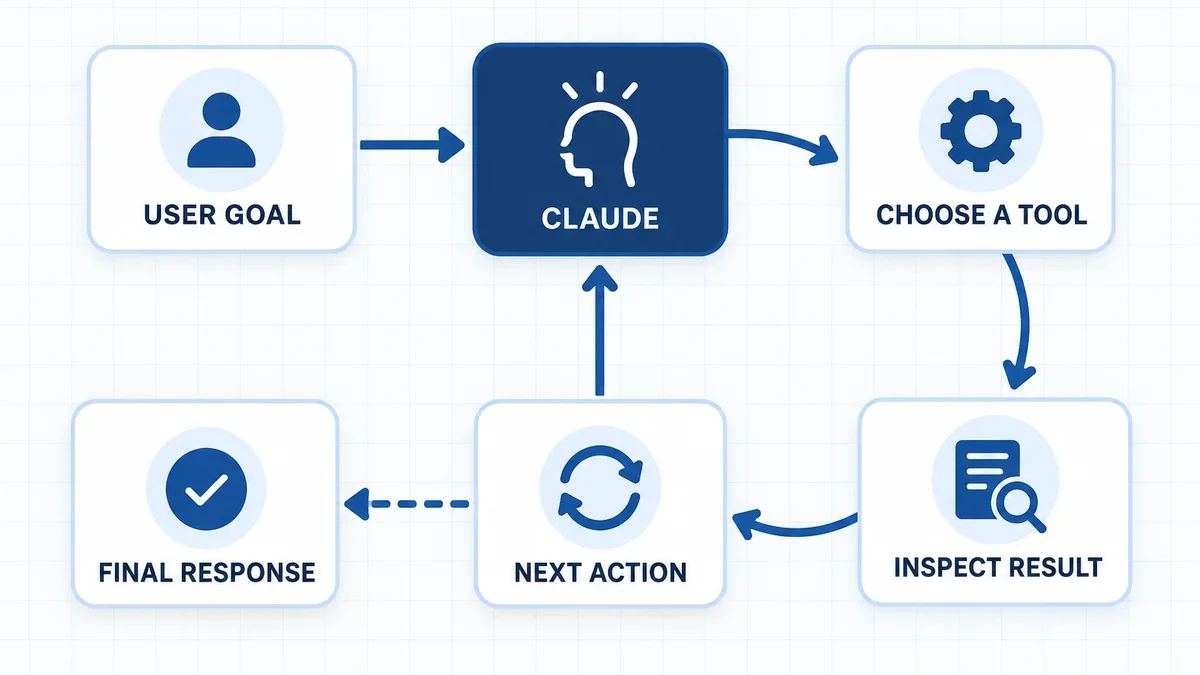
That ability to choose the next action is what separates an agent from a simple AI response.
Anthropic describes agents as systems where the language model can dynamically direct its own process and tool usage rather than following only a predefined workflow.
BUILD THE AGENT
Eight Steps, One Focused System
Open each step as you work through it, or expand everything if you prefer continuous reading.
01Define the Agent's JobFOUNDATION
Before writing any code, define exactly what the agent is responsible for.
Goal
Review a software project and identify important technical problems.
The agent should be able to
Read files, inspect folders and search through project content.
The agent should not be able to
Modify code, delete files, deploy software or execute unrestricted commands.
This distinction matters.
Every tool you give an AI agent increases what it can affect.
A narrowly defined agent is usually easier to test, secure and improve than one with broad access to everything.
02Set Up the Claude Agent SDKSETUP
We will use Python.
Anthropic's current Claude Agent SDK requires Python 3.10 or newer. The Claude Code CLI is bundled with the Python package, so a separate CLI installation is normally unnecessary.
Install the SDK:
pip install claude-agent-sdkThen make your Anthropic API key available as an environment variable:
export ANTHROPIC_API_KEY="your-api-key"On Windows PowerShell:
$env:ANTHROPIC_API_KEY="your-api-key"Now create a simple project structure:
my-agent/
    agent.py
    sample-project/
Place a small test codebase inside sample-project. That gives Claude something real to inspect.
03Build Your First Claude AgentCODE
Create agent.py:
import anyio

from claude_agent_sdk import (
    query,
    ClaudeAgentOptions,
    AssistantMessage,
    TextBlock,
)


async def main():
    options = ClaudeAgentOptions(
        model="sonnet",
        cwd="./sample-project",

        tools=[
            "Read",
            "Glob",
            "Grep",
        ],

        allowed_tools=[
            "Read",
            "Glob",
            "Grep",
        ],

        max_turns=6,

        system_prompt="""
        You are a technical review agent.

        Inspect the project before reaching conclusions.

        Identify the three most important technical issues.

        For each issue:
        1. Explain the problem.
        2. Reference the relevant evidence.
        3. Explain the potential impact.
        4. Recommend one practical next step.

        Do not modify files.
        Do not invent findings when evidence is unavailable.
        """
    )

    async for message in query(
        prompt="""
        Review this project and identify the three
        most important technical issues.
        """,
        options=options,
    ):
        if isinstance(message, AssistantMessage):
            for block in message.content:
                if isinstance(block, TextBlock):
                    print(block.text)


anyio.run(main)
Run it:
python agent.pyThe SDK's query() interface works well for one-off or automated agent tasks. Anthropic also provides ClaudeSDKClient for interactive or stateful conversations where follow-up messages and longer sessions are required.
04Understand the Tool ConfigurationTOOLS
This is one of the most important parts of the entire Claude agent tutorial.
We used:
tools=["Read", "Glob", "Grep"]This defines which built-in tools are available to the agent.
We also used:
allowed_tools=["Read", "Glob", "Grep"]These tools are permitted to execute without asking for approval each time.
The distinction is important. In the current SDK, tools controls the available built-in toolset, while allowed_tools controls which tools are automatically permitted.
Our agent only needs to inspect a project. It therefore does not need access to tools such as:
Write
Edit
Bash
Useful principleGive the agent the smallest toolset capable of completing its job.
You can always expand its capabilities later.
05Write Instructions for Actions, Not PersonalityPROMPT
A weak system prompt would say:
You are an expert software engineer. Review this project.
That tells Claude very little about how the task should be completed.
A stronger instruction defines the process:
Inspect the project using the available tools. Do not make assumptions about files you have not examined. Return no more than three findings, ordered by importance, with evidence and one recommended action for each.
The clearer these boundaries are, the easier your agent becomes to test.
06Connect the Agent to Real SystemsINTEGRATE
Reading files is useful for learning, but business AI agents usually need access to external systems.
A production agent might need to retrieve information from a CRM, check a database, call an internal API or access analytics.
The Claude Agent SDK supports custom tools and MCP-based integrations, allowing developers to expose application-specific capabilities to Claude.
Conceptually, a project-status tool could look like this:
@tool(
    "get_project_status",
    "Get the current status of a project",
    {"project_id": str},
)
async def get_project_status(args):

    project_id = args["project_id"]

    status = lookup_project(project_id)

    return {
        "content": [{
            "type": "text",
            "text": f"Project {project_id}: {status}"
        }]
    }
Your actual lookup_project() function could query your database or internal API.
Claude could then decide when retrieving that information is necessary.
That is where agents become particularly useful.
Your application provides access to real systems. Claude decides when and how those capabilities should be used to complete the task.
07Add Guardrails Before Adding AutonomySECURITY
A system prompt should never be your only security mechanism.
Suppose an agent can access three types of actions:
Read
Inspect records or retrieve information.
Write
Update files, CRM records or database entries.
Execute
Deploy code, send messages, delete information or trigger financial actions.
Those categories do not carry the same risk. As impact increases, your controls should become stronger.
The Claude Agent SDK includes controls such as maximum turns, budget limits, permission modes and hooks for intercepting tool behaviour.
A safer architecture for an important action might be:
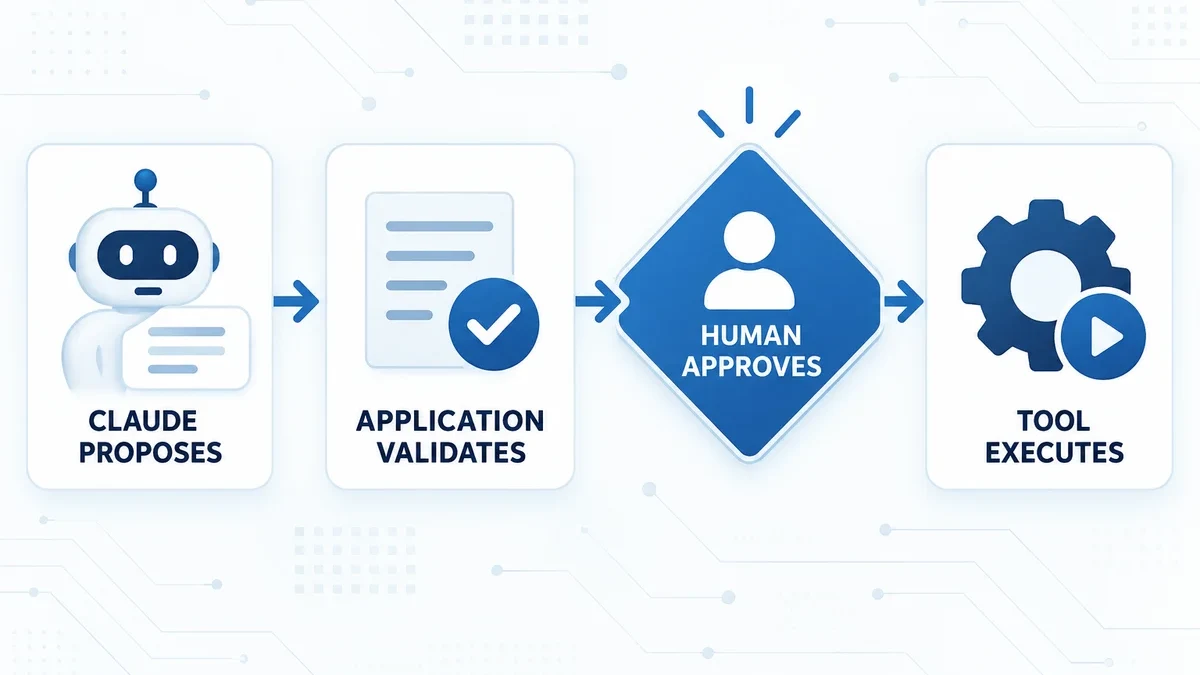
The model should operate inside security boundaries defined by your application.
It should not define those boundaries itself.
08Test Your AI Agent ProperlyEVALUATE
Do not decide an agent is ready because one demonstration worked.
Create several repeatable scenarios.
For this technical review agent, test what happens when the project is healthy, when a security problem exists, when important files are missing and when the agent receives a request outside its permitted actions.
Then evaluate more than the wording of the response.
- Did it choose the right tools?
- Did it inspect evidence before answering?
- Did it invent anything?
- Did it stay inside its permissions?
- How many turns did the task require?
- How much did the run cost?
An impressive response is not enough.
A production agent needs predictable behaviour when things go wrong too.
CHOOSE THE SIMPLEST SYSTEM
When Should You Not Build an AI Agent?
Not every application needs agentic behaviour.
If your workflow is simply:
a normal Claude API request is probably enough.
If your workflow is predictable from beginning to end, adding an autonomous agent may only increase complexity.
Agents make more sense when the system needs to do something like:
More autonomy creates more flexibility. It also creates more possible failure paths.
The goal should never be to build the most autonomous system possible.
The goal is to build the simplest system that reliably solves the problem.
EXTEND WITH PURPOSE
Where to Take Your Claude AI Agent Next
Once the basic agent works consistently, you can start extending it.
That might include internal APIs, databases, web search, CRM systems, custom MCP tools, persistent state, human approval workflows or monitoring.
Do not add everything at once.
First make one agent perform one clearly defined job well.
Then expand its capabilities when the use case actually requires them.
DESIGN THE SYSTEM AROUND THE MODEL
Final Thoughts
Learning how to build an AI agent with Claude is less about writing a huge prompt and more about designing the system around the model.
Claude provides the reasoning.
Your application defines the tools, data, permissions and safety boundaries.
Start with one clear job. Give the agent only the tools it needs. Test its failures as carefully as its successes.
Then increase autonomy where it creates genuine value.
That approach gives you something more useful than an impressive AI demo.
It gives you an agent built to perform a real task reliably.
Back to SOLVINTAL Academy